
This release makes the screening and consultation chat faster to use and ensures correct address information in appointment confirmations.
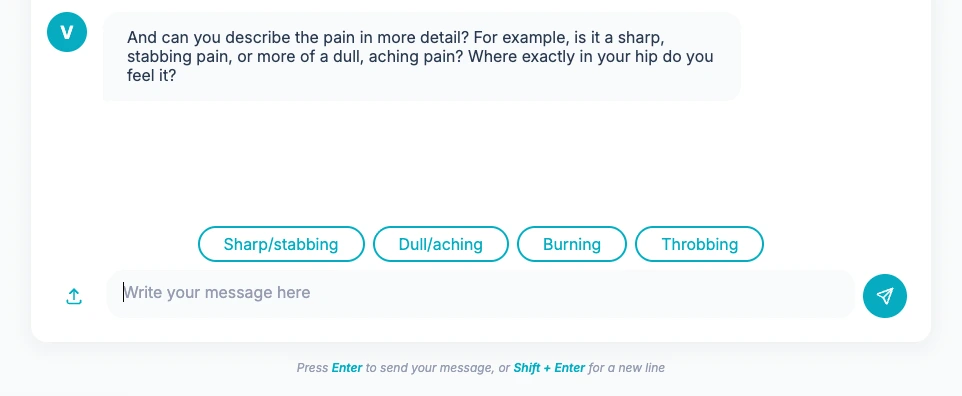
Smart answer suggestions in the chat
The chatbot now automatically suggests quick replies when a question lends itself to them — think of buttons like "Yes" or "No" that you can select with a single click. This makes completing a screening faster and smoother, without having to type every time.
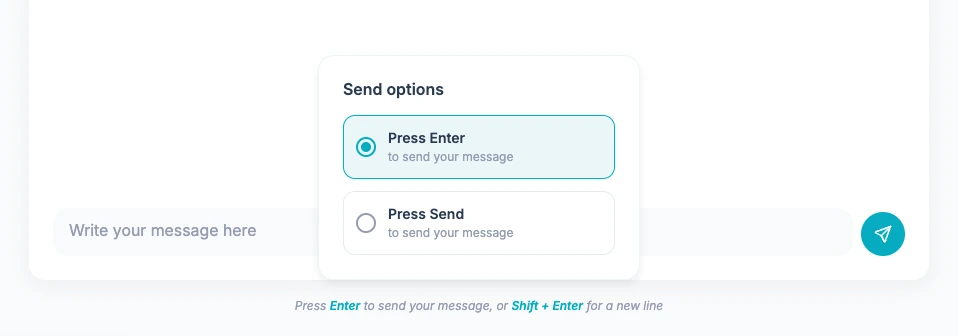
Choose how you send messages in the chat
On desktop, you can now set whether you send messages with the Enter key or with the Send button. The active setting is visible below the input field and easily adjustable. On mobile, the Send button remains the default.
Correct address in appointment confirmation emails
Appointment confirmations now automatically display the correct location address: the specific address of the room if configured, otherwise the general address of the organisation. If no address is available, no address is displayed.
Other Improvements & Fixes
- Email buttons are now displayed correctly in Outlook with the correct brand colours and sufficient contrast.
- The screening chat now starts correctly after accepting consent, even on first use.
- Buttons in emails are now centred.
- The chat interface now closes correctly when a screening flow is completed.
- The "current time" indicator on the calendar is no longer displayed above appointment tooltips.
- The patient search function now works stably even with an empty or incomplete search term.
- The thinking state of the bot now shows a single clear indicator instead of two overlapping ones.
- The interaction pages have been visually refreshed and laid out more clearly.